


If you’re searching for how to delete Instagram account, you’re not the only one. In every update, Instagram changes its settings, which is confusing for many users. Because of these constant updates, many people struggle to find the correct deletion option
In this guide, we will walk you through the steps to delete Insta account permanently. We will also explain what happens after deletion, and show you how to deactivate or recover your account if you change your mind.
How to Delete Instagram Account?
Deleting your Instagram account means permanently removing your profile, photos, videos, followers, likes, and messages. Once the deletion process is complete, you won’t be able to get your data back. So if you’re a social media influencer or a regular user with important content, make sure to download your data first.
Instagram now manages deletion through the Accounts Center, which you can access via the mobile app or a browser.
How to Delete Instagram Account from the Mobile App?
Here is how to permanently delete your Instagram account on your smartphone.
How to Delete Your Instagram Account on Android
- Log in to your Instagram account and navigate to your profile
- Tap the three-line icon in the top right corner.
- Select ‘Account Center’.
- Under the ‘Account settings’ section, tap ‘Personal details’.
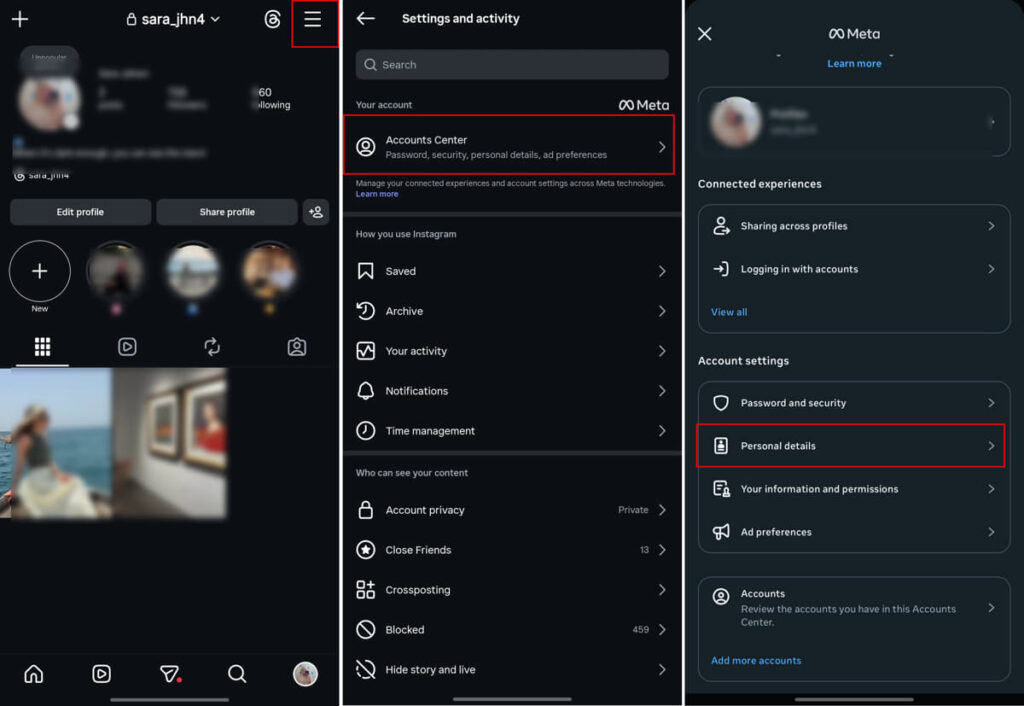
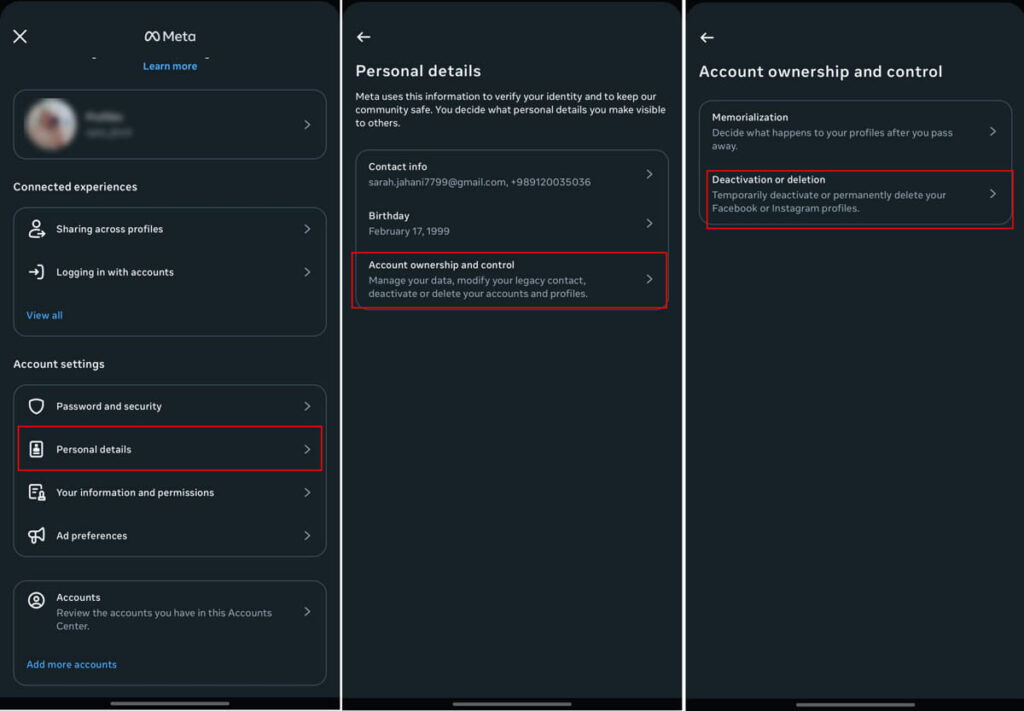
5. Choose ‘Account ownership and control’.
6. Tap ‘Deactivation or deletion’.
7. Choose ‘Delete account’ and confirm your action by providing your password.
How to Delete an Account on Instagram on iPhone
Wondering how to delete instagram account on iphone? The steps are pretty similar. Here is how to do it:
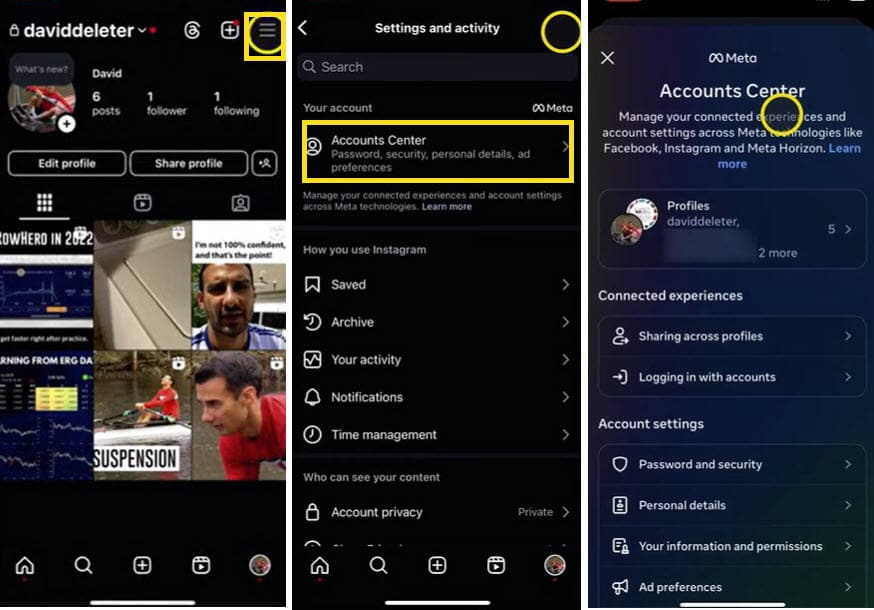
- Tap on the profile icon in the bottom right of the app.
- Tap the menu icon in the top right corner.
- Tap Accounts Center, then tap Personal details.
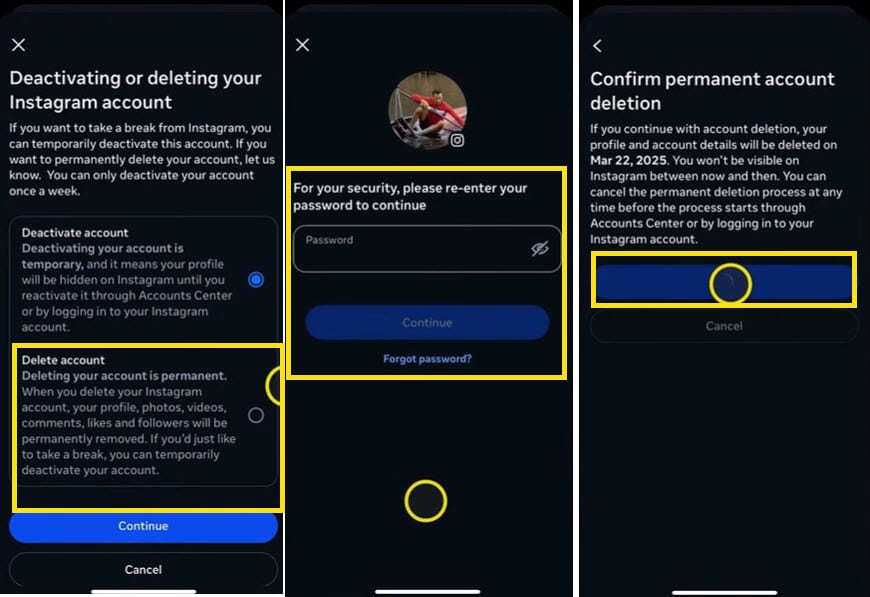
4. Select Account ownership and control, then tap Deactivation or deletion.
5. Choose the account you’d like to permanently delete.
6. Tap Delete account and confirm the action by providing your password.
How to Delete Instagram Account from a Browser
If you don’t have access to your phone, you can use your PC to delete your account. Here is how to delete a IG account on your browser.
- Open your profile and tap on the ‘Settings’ icon in front of your username.
- Click on ‘Settings and privacy’.
- From the left toolbar, click on ‘Account Center’.
- Click ‘Personal details’.
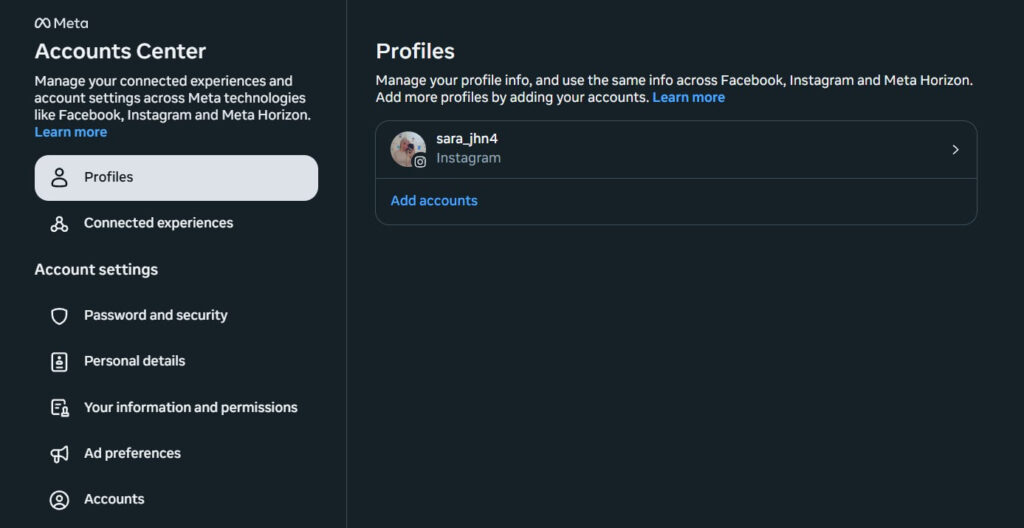
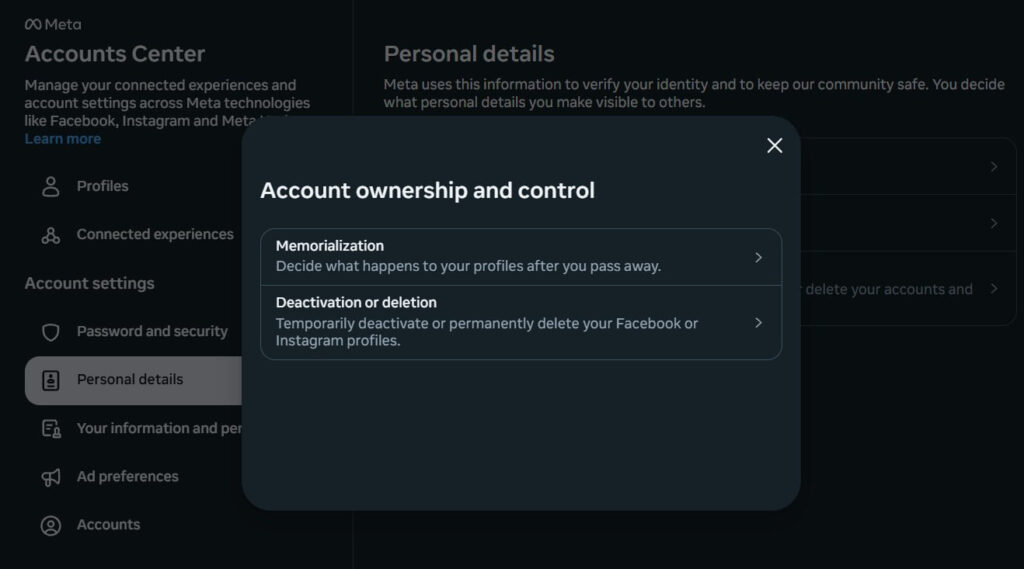
- Select ‘Account ownership and control’.
- Choose ‘Delete account’ and confirm your action.
You can also use the Instagram delete account link to directly request account deletion.
What Happens When You Delete Instagram Account?
Now that you know how to permanently delete your Instagram account, let’s see what will happen after that. When you delete your Instagram account, your profile immediately becomes invisible to other users. People won’t be able to search for you, view your profile, or interact with your content. This also means all your posts, reels, stories, and even saved Instagram post ideas or drafts you planned to publish will disappear from the platform.
Some users start looking for privacy options like how to hide Instagram followers before deciding to delete their account, but permanent deletion removes your profile and all follower data completely from the platform.
Also, keep in mind that Instagram does not erase everything instantly from its system. it gives you 30 days, and during that time, your account is temporarily disabled. If you log back in within those 30 days, you can cancel the deletion and restore your account.
After the 30-day window passes, your account and data are permanently deleted and cannot be recovered. So before following the mentioned steps for how to delete instagram account, consider that you might lose the shared data and even the username.
Now you know how to delete Instagram account permanently, but to keep your shared data safe, make sure to export it. In the next parts, we willshow you how to do it.
How To Download Instagram Data?
Once you know how to delete Instagram account, it’s time to download your Instagram data before any action. This allows you to keep a copy of your photos, videos, messages, comments, profile information, and more.
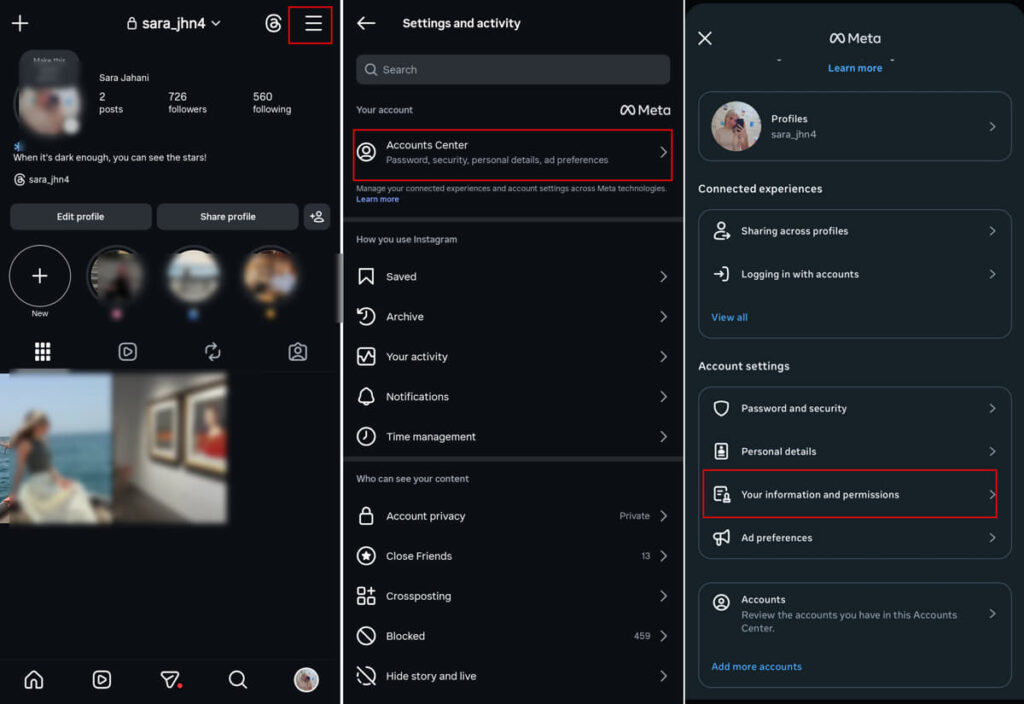
- Go to your profile and tap on the three-line icon at the top of your screen.
- Select ‘Account Center’.
- Under the ‘Account settings’ section, select ‘Your information and permissions’.
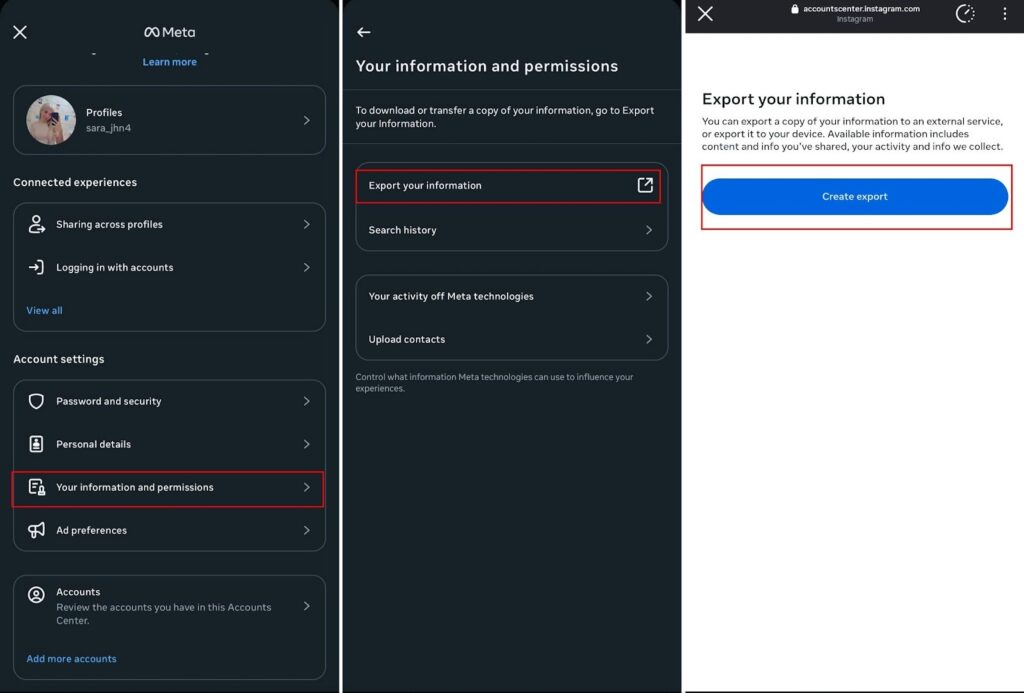
4. Tap ‘Export your information’.
5. In the opened tab, select ‘Create export’.
How To Recover A Deleted Instagram Account?
Have you ever asked yourself how do I delete a Instagram account, but after a while, changed your mind? If it’s been less than 30 days, you can recover your account:
- Simply log back into your account.
- Tap Cancel Deletion when prompted.
If it’s been longer than 30 days, account recovery is not possible anymore. You can use the same username (if not taken) to create a new account.
How to Deactivate an Instagram Account?
Not sure if you want to leave permanently or just take a break from the app? In this case, deactivating your account is a better option. The process is pretty similar to how to delete instagram account. Let’s check out the steps for deactivating your account.
- Log in to your Instagram account and navigate to your profile.
- Tap the three-line icon in the top right corner.
- Select ‘Account Center’.
- Under the ‘Account settings’ section, tap ‘Personal details’.
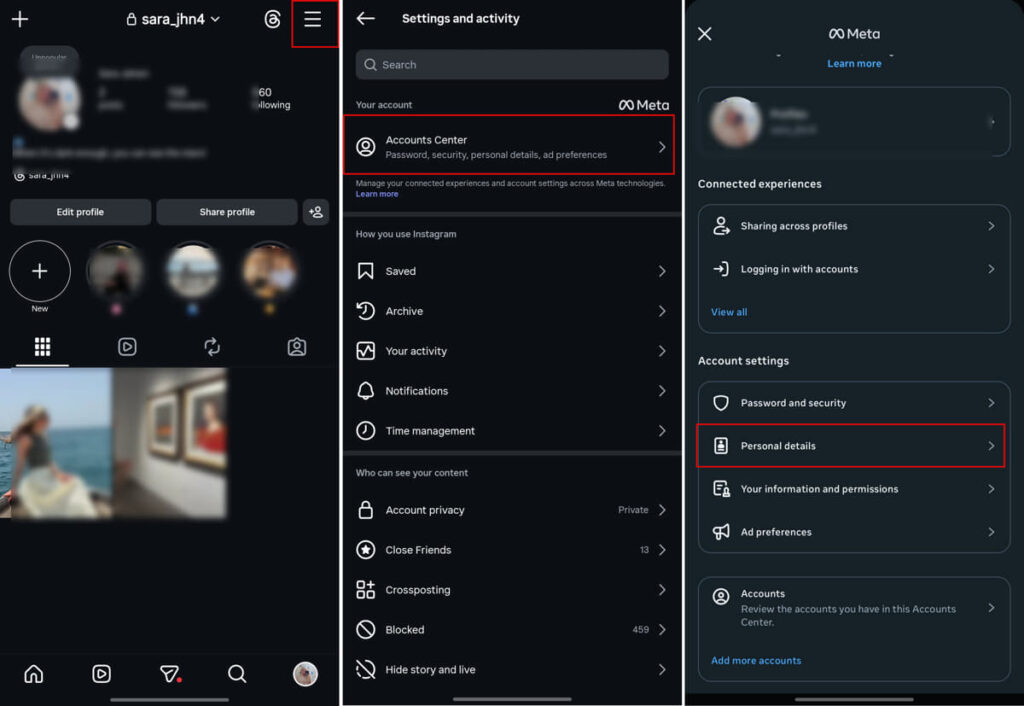
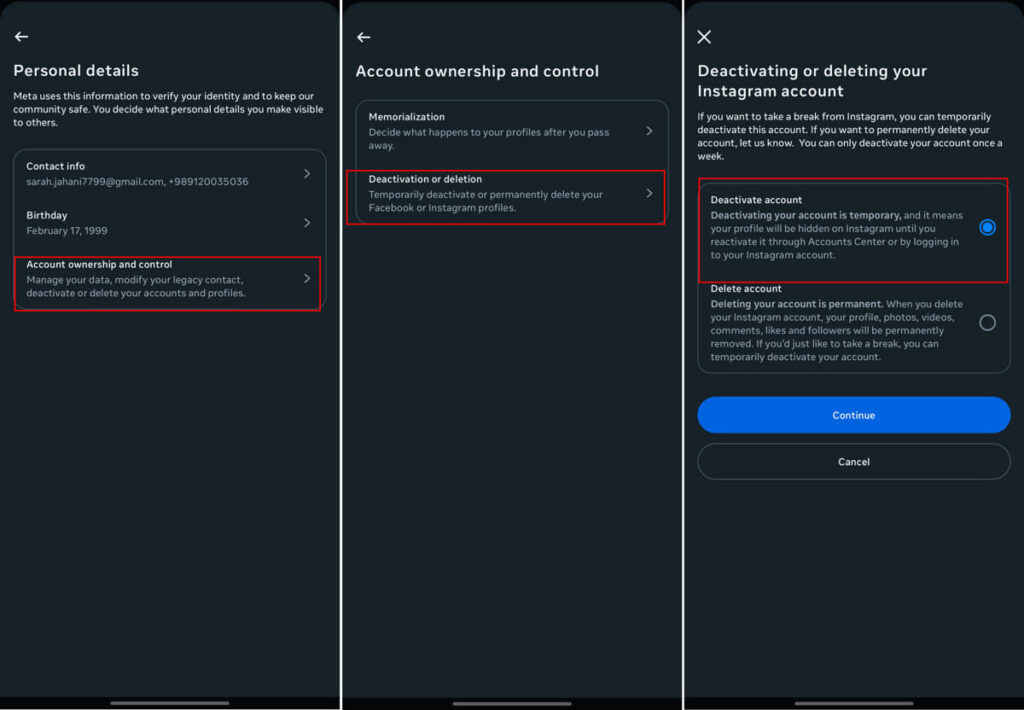
4. Choose ‘Account ownership and control’.
5. Tap ‘Deactivation or deletion’.
How To Reactivate an Instagram Account?
If you’ve temporarily deactivated your Instagram account and changed your mind, the good news is that reactivating it is very simple.
All you need to do is open the Instagram app and use your login information to access your account.
Deactivate Instagram Account vs. Delete Instagram Account
So far, we talked about how to delete an Instagram account and how to deactivate it. Here we will compare them to help you make a better decision.
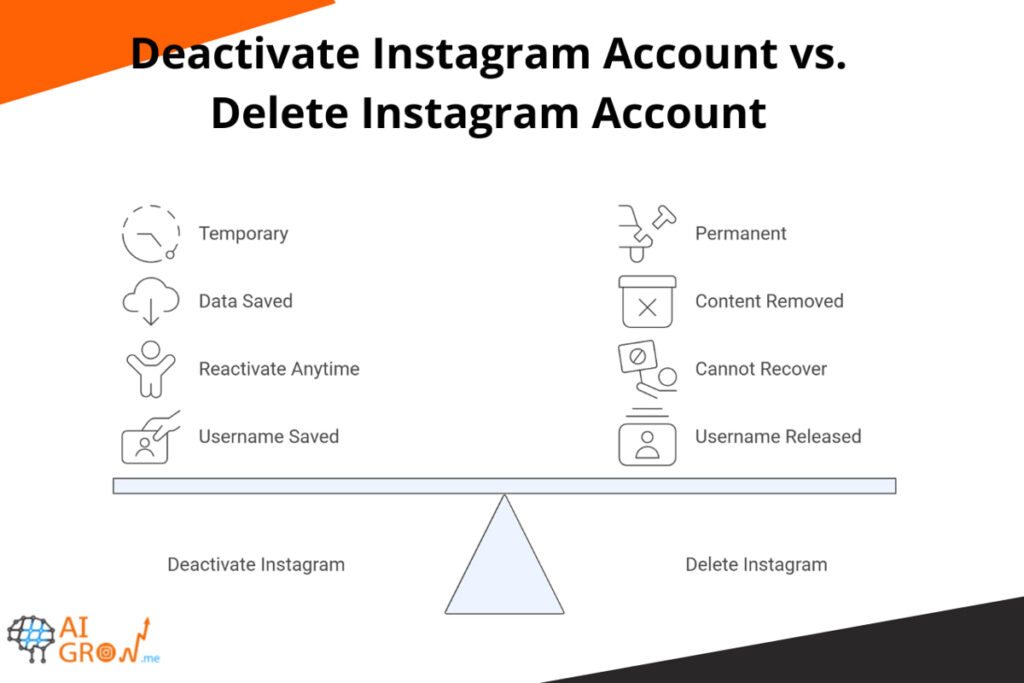
Deactivate Instagram Account
- Temporary
- Profile hidden
- Data saved
- Can reactivate anytime
Delete Instagram Account
- Permanent (after 30 days)
- All content removed
- Cannot recover after 30 days
- Username may be released
So if you are wondering how do I delete my Instagram, make sure to compare the options.
Conclusion
Now you know exactly how to delete Instagram account on both mobile app and browser. Instagram has recently moved the option into the Accounts Center, but the process is still simple.
Before making a final decision, remember that deleting your account is permanent after 30 days. If you’re unsure, temporarily deactivating your account might be a safer option. And don’t forget to download your data if you want to keep your photos and memories.
FAQs
Yes, you can delete an Instagram account permanently. Instagram allows users to remove their accounts through the Accounts Center in the app or via a browser. Once you request deletion, your account enters a 30-day grace period. During this time, you can log back in to cancel the deletion.
To delete an IG (Instagram) account, go to Settings and privacy in the app, then open Accounts Center. From there, tap Personal details, select Account ownership and control, and choose Deactivation or deletion. Select your account, tap Delete account, and confirm your password.
You can also use the direct link to delete your Instagram account by proving your password.
No, you cannot delete your Instagram account without entering your password. Instagram requires password verification to confirm your identity before allowing permanent deletion.
If you’ve forgotten your password, you’ll need to reset it first using the “Forgot password?” option on the login page. Once you regain access to your account, follow the steps mentioned for how to delete Instagram account.