


Instagram is a leading social media platform that offers various features that allow users to share moments, connect with friends, and build communities. However, with this connectivity comes the need for control over who sees your activity, especially your follower list. Many users frequently ask, how to hide followers on Instagram?
This comprehensive guide will elaborate on the latest methods and updates for 2026, helping you understand how to hide your followers on Instagram and enhance your privacy.
We’ll explore each method in detail, addressing common questions like how to hide your following list on Instagram without private account and how to hide followers on Instagram from friends.
Best Methods to Hide Followers on Instagram
While Instagram’s privacy features are constantly evolving, the fundamental approaches to managing follower visibility remain consistent.
It’s important to note that a complete, universal solution to hide followers on Instagram from absolutely everyone does not exist. However, by combining several strategies, you can achieve a significant level of privacy.
Let’s start!
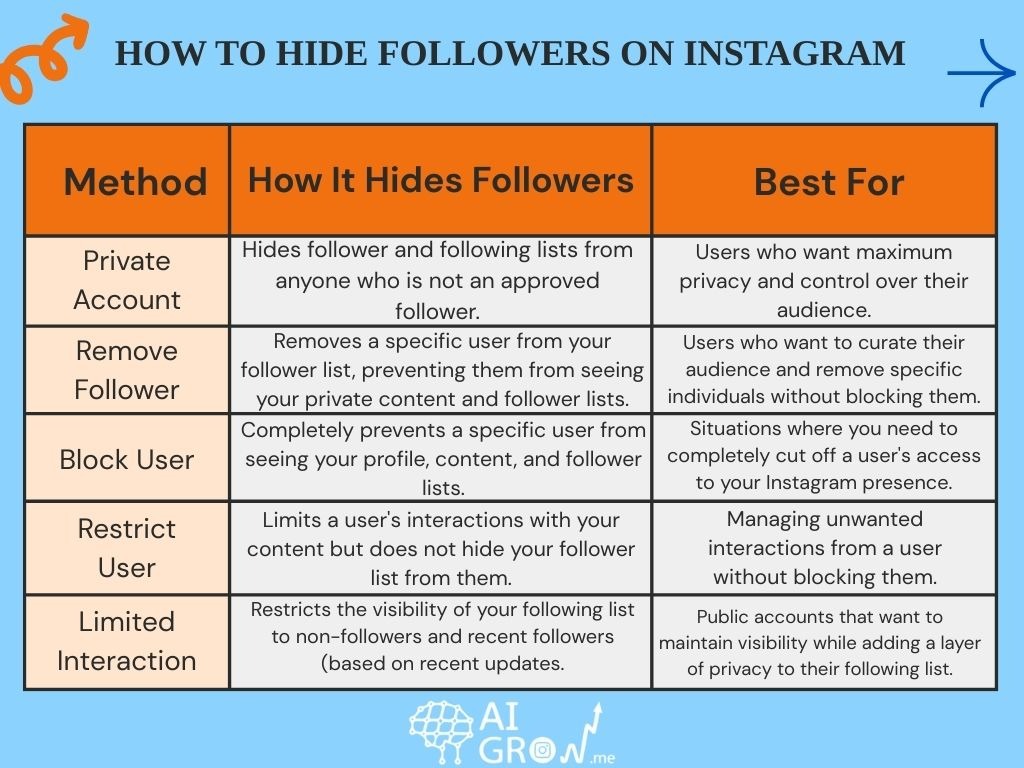
1. Setting Your Instagram Profile to Private
The most fundamental and effective way to hide your followers on Instagram from non-followers is by setting your account to private. This action significantly restricts who can view your content and, crucially, your follower and following lists.
When your account is private, only users you have explicitly approved as followers can see your posts, stories, and the full list of people who follow you and who you follow. However, you still can’t hide your following list on Instagram from followers.
Here’s how you can set your account to private:
1. Open the Instagram app on your mobile device.
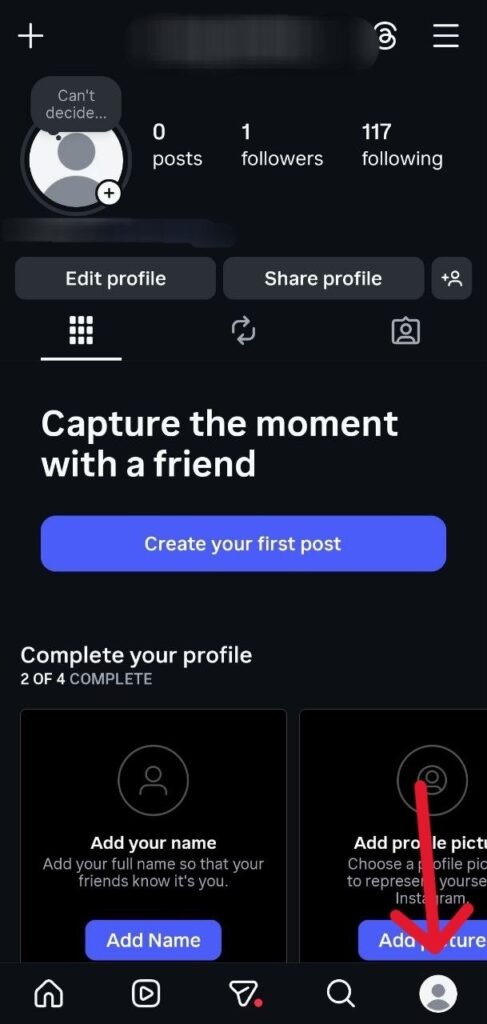
2. Navigate to your profile by tapping your profile picture in the bottom right corner.
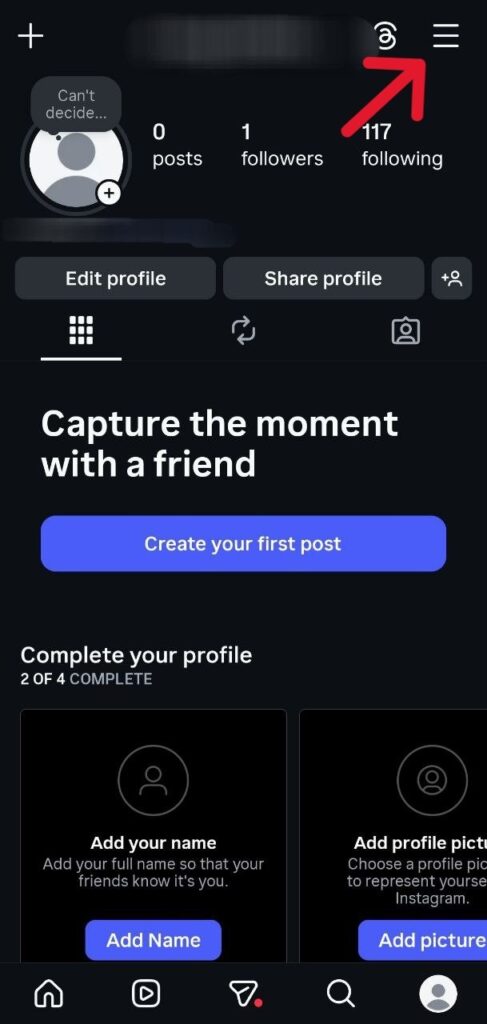
3. Tap the three horizontal lines (menu icon) in the top right corner to open the settings menu.
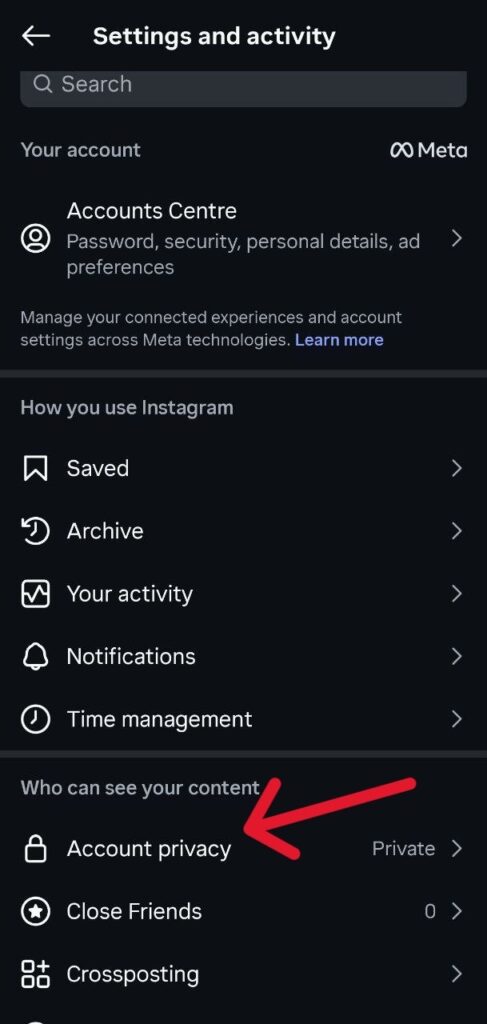
4. Select Account privacy.
6. Toggle the Private account option to the ‘On’ position.
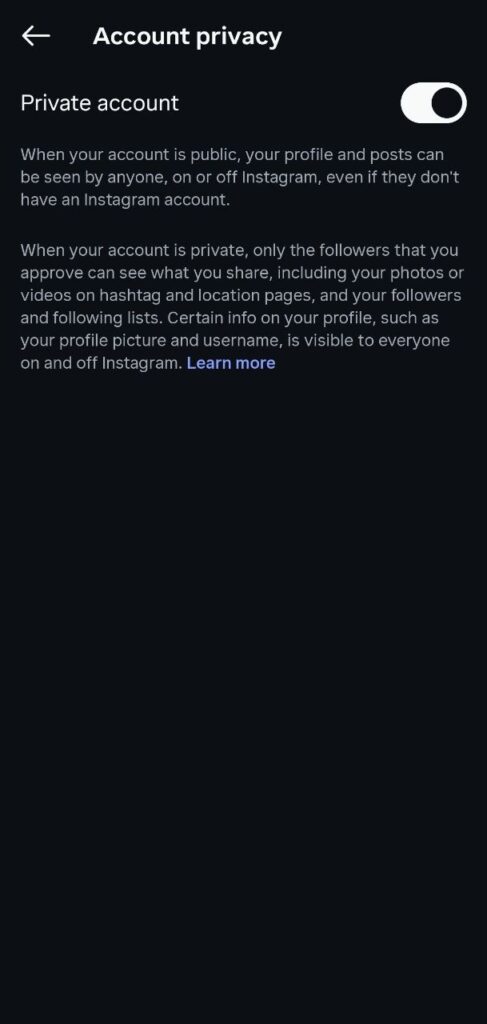
Once activated, new users will need to send a follow request, which you can approve or deny. For those wondering how to hide followers on Instagram without private account, it’s important to understand that a private account is the primary mechanism Instagram provides for this level of control.
While existing approved followers will still be able to see your lists, this step is indispensable for preventing strangers from accessing this information.
2. Removing Unwanted Followers
Even with a private account, you might have existing followers you no longer wish to share your follower list with. Instagram allows you to remove followers manually without blocking them, which can be a less confrontational approach.
When you remove a follower, they are not notified, and they will no longer be able to see your private content or your follower/following lists. They would need to send a new follow request if they wish to see your content again.
Here are the steps to remove a follower:
1. Go to your profile and tap on your Followers count.
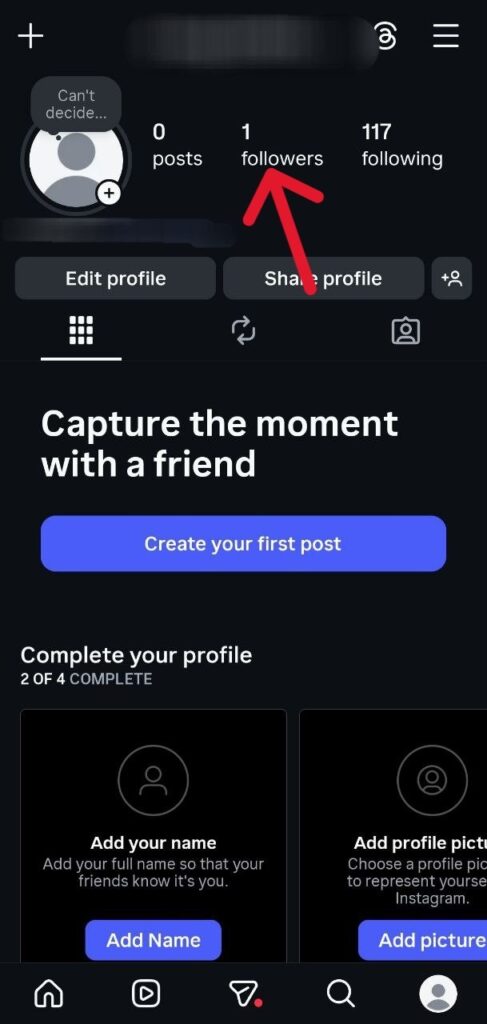
2. Browse through your follower list or use the search bar to find the person you want to remove.
3. Tap the three dots next to their name.
4. Select Remove follower.
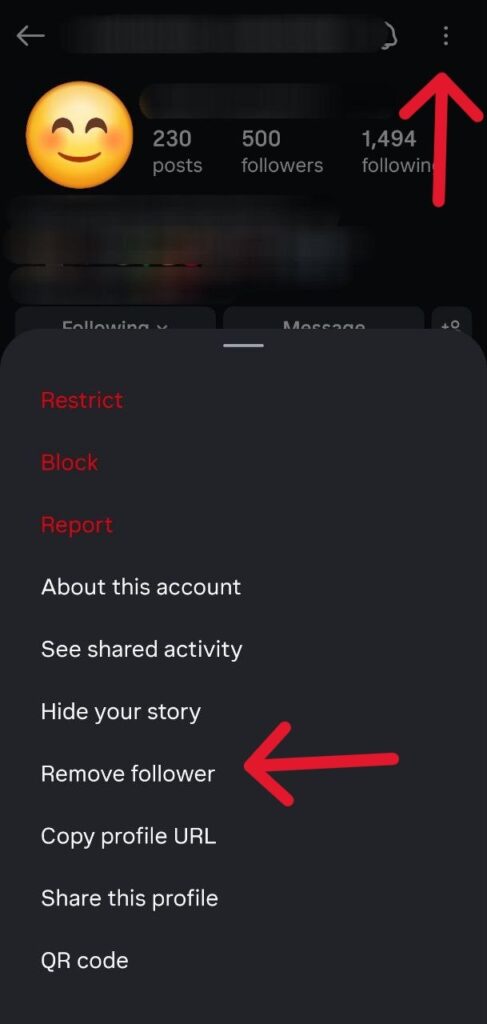
This method is particularly useful if you’re looking for ways to hide your followers on Instagram from friends or acquaintances with whom your relationship has changed.
3. Blocking Specific Users
For situations where you need to completely prevent someone from seeing your profile, content, and follower lists, blocking is the most definitive action.
When you block a user, they will no longer be able to find your profile, see your posts, stories, or any of your lists. They also won’t be notified that you’ve blocked them.
Here is how to block someone on Instagram:
1. Visit the profile of the user you wish to block.
2. Tap the three dots in the top right corner of their profile.
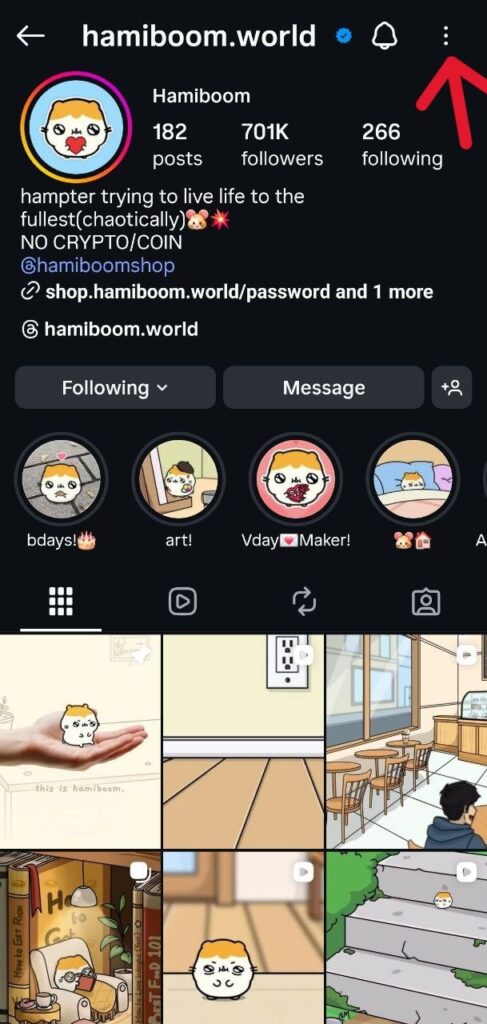
3. Select Block from the options.
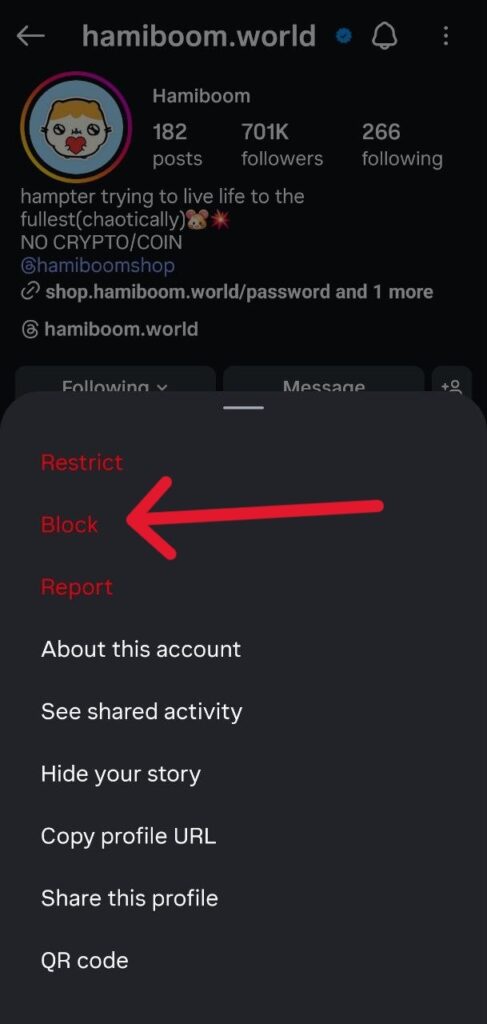
Blocking is an effective solution if you need to hide followers on Instagram from everyone in relation to a specific individual, ensuring they have no access to your Instagram presence.
4. Using Instagram’s Restrict Feature
Instagram’s restrict feature offers a handy approach to managing unwanted interactions without resorting to a full block.
While it doesn’t directly hide followers on Instagram, it significantly limits how a restricted user can interact with your content and how their interactions are visible to others. This can indirectly contribute to a more private experience by reducing unwanted visibility of certain comments or activities.
What happens when you restrict someone:
- Comments from the restricted user on your posts will only be visible to them and you. You can choose to view the comment and approve it, making it visible to others.
- They won’t be able to see when you’re online or if you’ve read their direct messages.
- Messages from a restricted account will be moved to your Message Requests folder, and you won’t receive notifications for them.
How to restrict an Instagram user:
1. Go to the profile of the user you wish to restrict.
2. Tap the three dots in the top right corner.
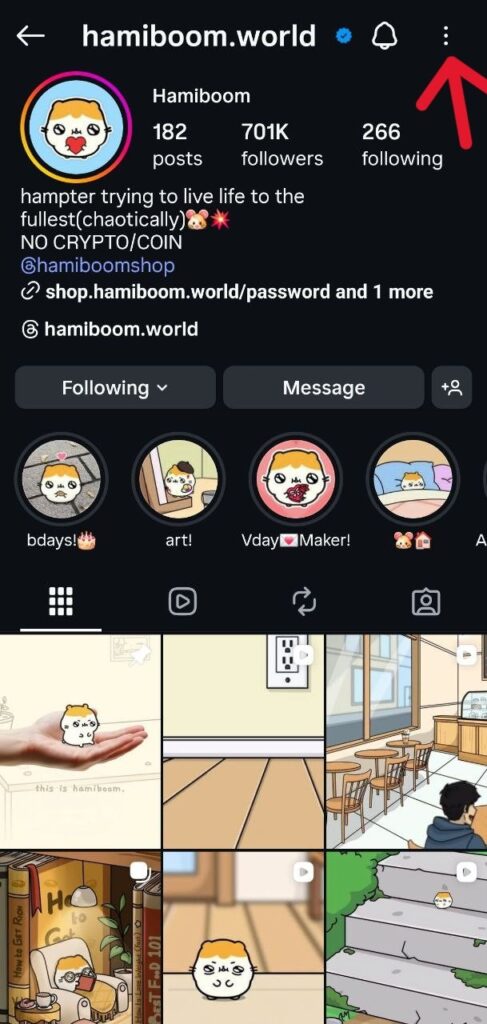
3. Select Restrict from the options.
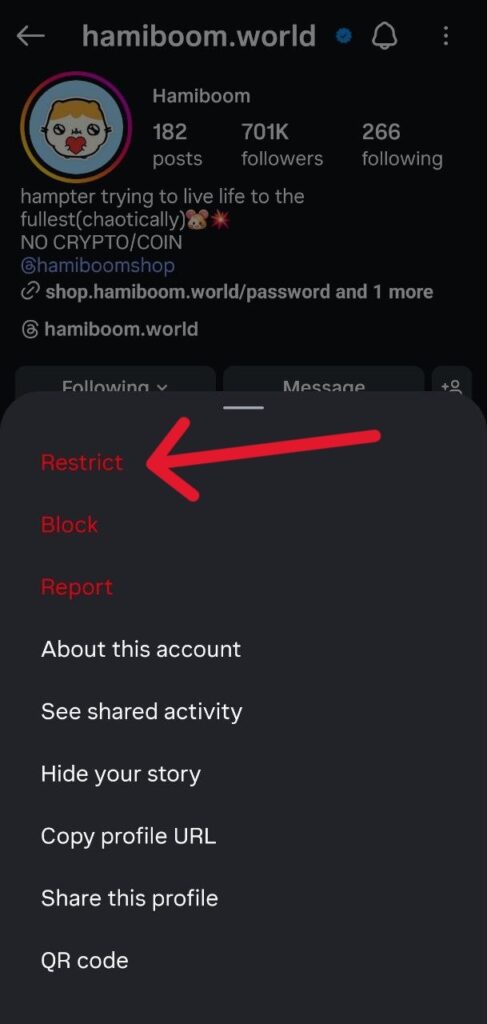
This feature is particularly useful for managing interactions with individuals you know but prefer to keep at a distance, offering a way to hide your followers on Instagram from friends in a less permanent manner than blocking.
5. The Limited Interaction Feature: A New Layer of Privacy (2025/2026 Update)
Recent updates to Instagram, particularly around late 2025 and early 2026, have highlighted a feature often referred to as “Limited Interaction” or “Limits.” While not explicitly designed to hide followers on Instagram in the traditional sense, this feature offers a unique way to control who can see your following list and interact with your content, especially from non-followers or recent followers.
Some users have reported that by enabling “Limited Interaction,” they can effectively hide your following list on Instagram without private account from a broader audience. The mechanism appears to be that non-followers and recent followers, or those not on your
Close Friends list will have their ability to view your following list restricted. This can be a game-changer for those who want to maintain a public profile but still desire a degree of privacy regarding their connections.
How to enable Limited Interaction (based on recent user reports and updates):
1. Open the Instagram app and go to your profile.
2. Tap the three horizontal lines (menu icon) in the top right corner.
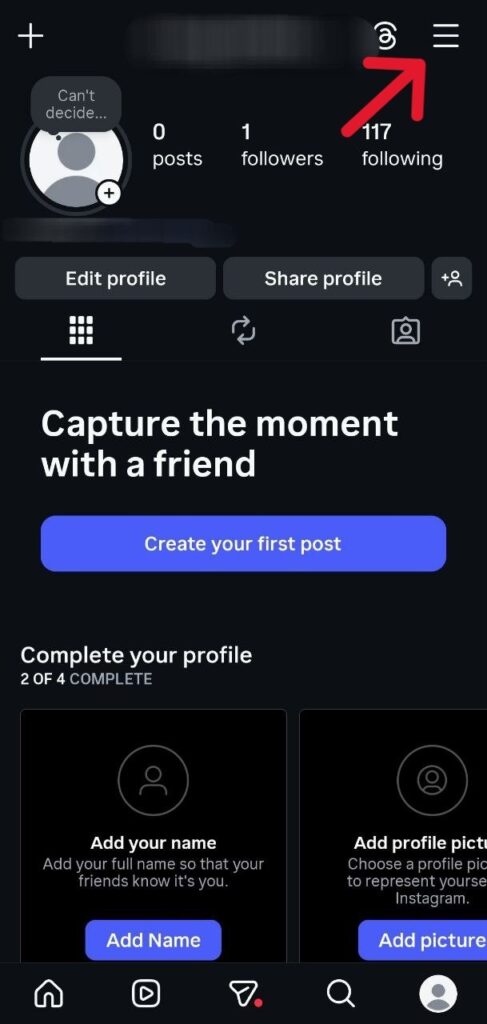
3. Scroll down until you see ‘Limit Interactions’.
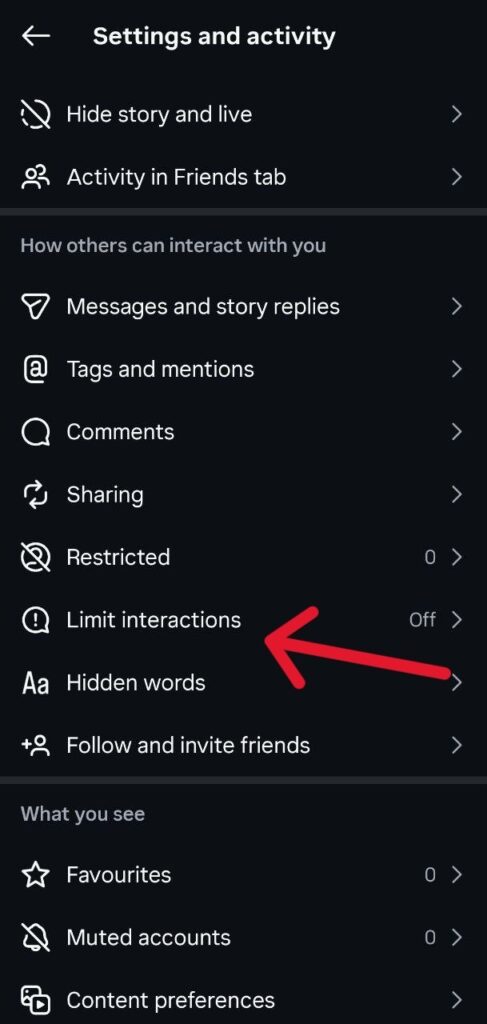
5. Select the option that appears, which might be labeled “Limits” or “Limited Interaction.”
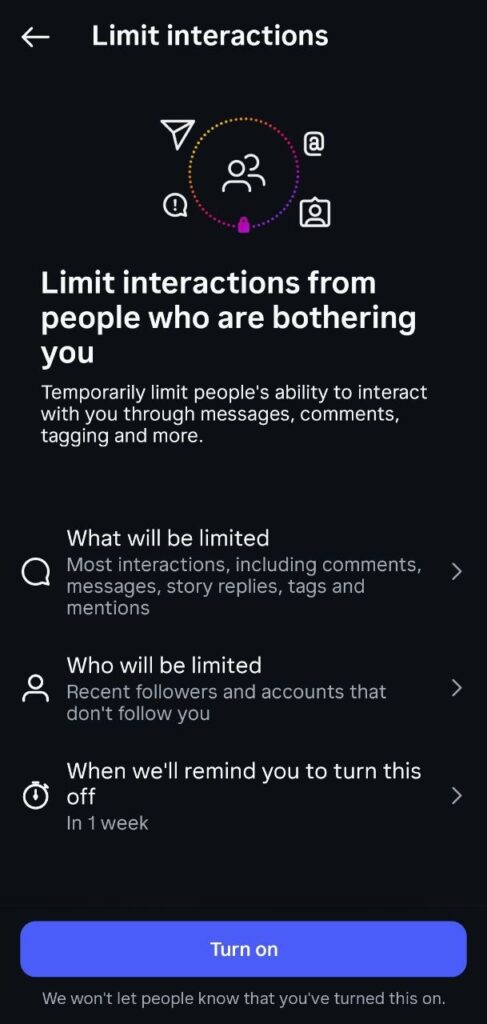
6. You will likely find options to limit interactions from non-followers and recent followers. Enable these settings.
This feature is particularly useful for social media influencers and public figures who cannot set their accounts to private but still want to hide followers on Instagram from casual observers or potential spammers.
It provides a nuanced control over visibility, allowing you to manage your audience more effectively without sacrificing your public presence.
What Cannot Be Hidden on Instagram?
Despite the various privacy settings, it’s crucial to understand the limitations of hiding information on Instagram. There are certain aspects that, by design, cannot be fully concealed:
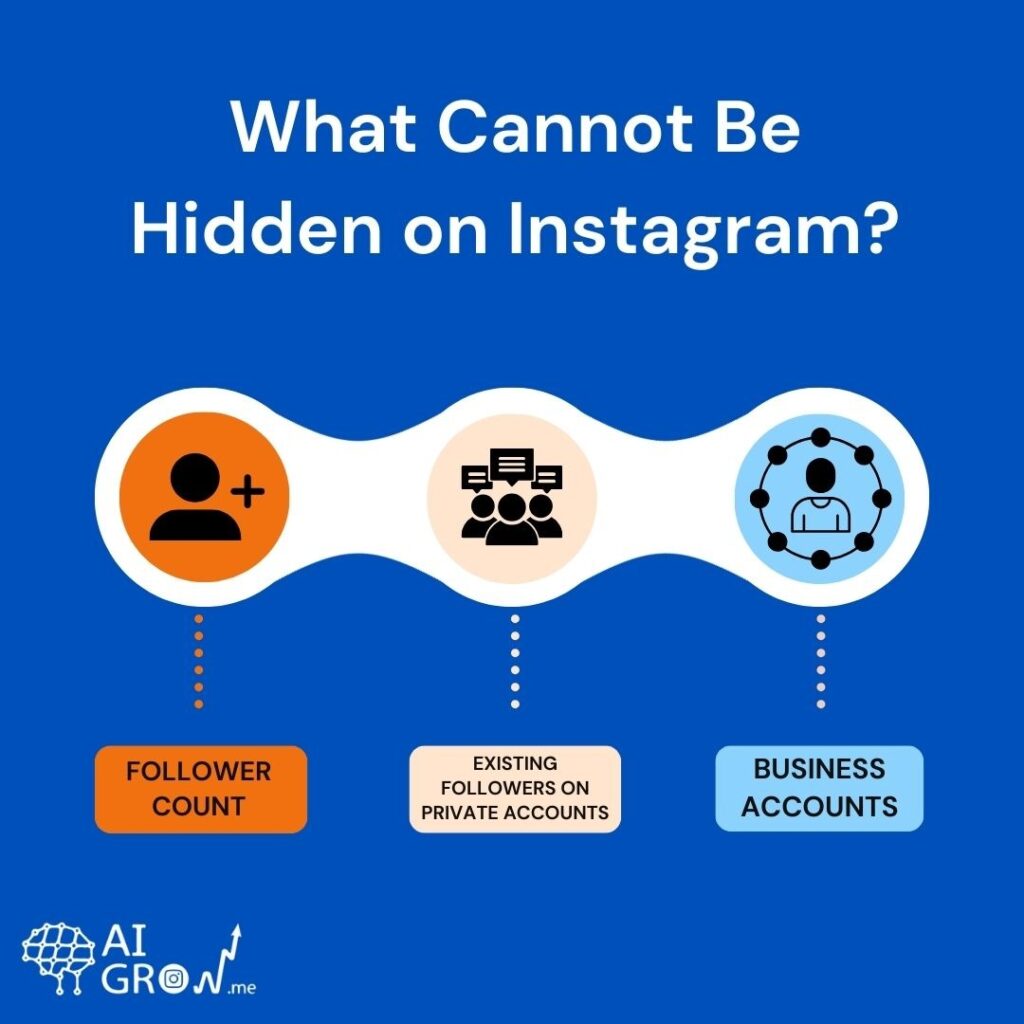
- Follower Count: While you can restrict who sees your actual follower list, the total number of followers you have is generally visible on public accounts. Even with a private account, the count is often visible, though the list itself is hidden. This means you cannot entirely hide followers count on Instagram.
- Existing Followers on Private Accounts: If your account is private, your approved followers will still be able to see your follower and following lists. There is currently no feature to hide followers on Instagram from followers who are already approved
- Business Accounts: Business accounts on Instagram are inherently public and cannot be set to private. This means that for a business account, the follower list will always be visible to anyone who visits the profile.
If you operate a business account and wish to hide followers on Instagram business account, your options are limited to removing or blocking specific users, or utilizing the limited Interaction feature if applicable. You cannot hide followers on Instagram public account in the same way you can with a personal private account.
If maintaining complete privacy is essential and these options are not sufficient, some users ultimately choose to delete their Instagram account entirely to remove all follower data and profile visibility from the platform.
Meta Verified and Follower Visibility
With the introduction of Meta Verified, Instagram offers a subscription bundle that includes a verified badge, proactive account protection, and direct account support.
While Meta Verified primarily focuses on authenticity and support, some users have inquired about its impact on follower visibility, specifically, how to hide followers on Instagram Meta Verified accounts. As of the latest updates, Meta Verified does not inherently provide a feature to hide your follower or following lists beyond the existing privacy settings available to all users.
Even with a Meta Verified badge, the core mechanisms for hiding followers remain the same: setting your account to private, removing unwanted followers, blocking, or using the restrict feature.
If you have a Meta Verified account and wish to manage follower visibility, you would still apply the strategies outlined above. The verification badge signifies authenticity, not an additional layer of privacy control over your follower lists.
How to Hide Your Following List on Instagram Without a Private Account
This is a common and important question, as many users want to maintain a public profile for reach or professional reasons but still wish to hide their following list on Instagram without private account.
As discussed, Instagram does not offer a direct, one-click solution to hide your following list while keeping your account public. However, the
Limited Interaction feature, as reported in late 2025 and early 2026, appears to be the most promising development in this area. By enabling this feature, you can restrict the visibility of your following list to non-followers and recent followers, effectively achieving a level of privacy without making your entire account private.
How to Hide Followers on Instagram from Friends
When you want to hide followers on Instagram from friends, the approach depends on the level of privacy you desire.
If you simply want to prevent a friend from seeing your content and follower lists, you can remove them as a follower (if your account is private) or block them.
However, if you want to maintain a connection but limit their ability to see your follower list, the situation is more nuanced.
Currently, if a friend follows you, they can see your follower and following lists. There is no setting to selectively hide these lists from specific followers. The only way to prevent a friend from seeing your follower list is to remove them as a follower or block them.
The Restrict feature can limit their interactions with you, but it does not hide your follower list from them.
Final Words on How to Hide Followers on Instagram
By implementing the strategies outlined in this guide, you can confidently navigate Instagram’s privacy settings, hide your followers on Instagram to the extent that suits your needs, and have an online presence that aligns with your personal and professional goals.
Remember, your digital privacy is in your hands, and taking proactive steps to manage it is more important than ever. So, if you wonder ‘how to hide my followers on Instagram’, these are the steps you need to take.
FAQs
Q1. Can you completely hide your followers on Instagram?
No, Instagram does not currently offer a feature that allows users to completely hide their followers from everyone. However, you can limit who can see your follower list by setting your account to private, removing unwanted followers, blocking users, or using interaction-limiting features.
Q2. Does making your Instagram account private hide your followers?
Yes. When your account is set to private, only users you approve as followers can see your posts, stories, and your follower and following lists. People who do not follow you will not be able to see these lists.
Q3. Can I Hide Followers From One Person?
No, Instagram does not allow you to hide your followers or following list from just one person if they already follow you.
If someone follows you, they can usually see your follower and following lists. To stop a specific person from seeing your followers, you can remove them as a follower (if your account is private) or block them.
These are currently the only ways to prevent someone from viewing your follower list on Instagram.